Steps to Register for Courses
1. Check Your Registration Appointment
All active students receive a registration appointment in accesSPoint.
To find yours:
- Log into accesSPoint.
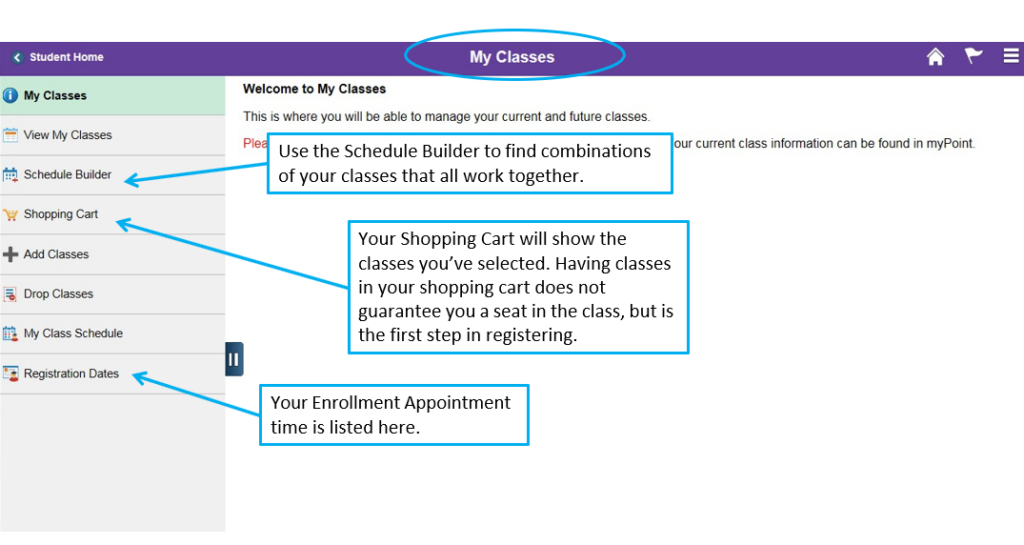
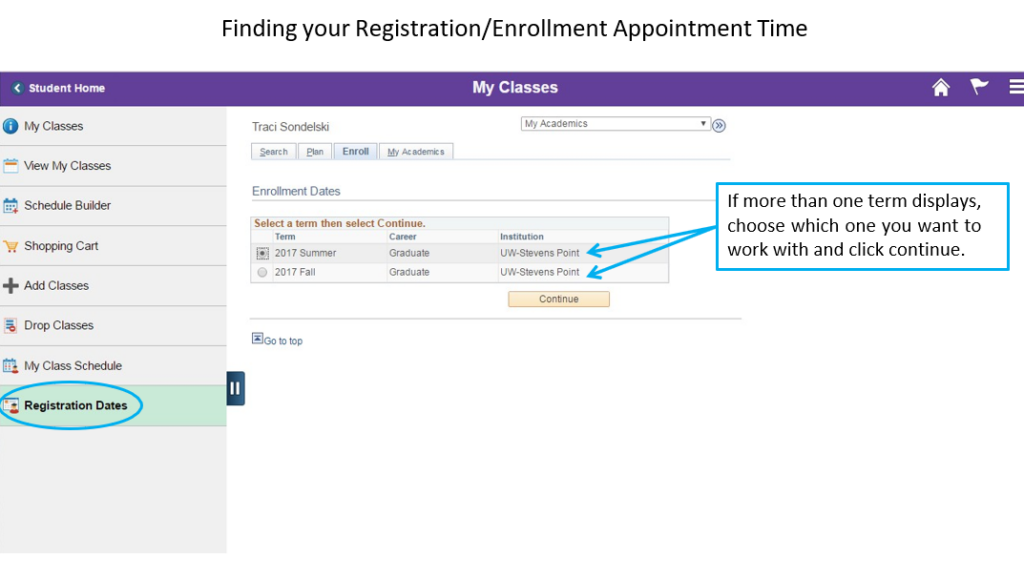
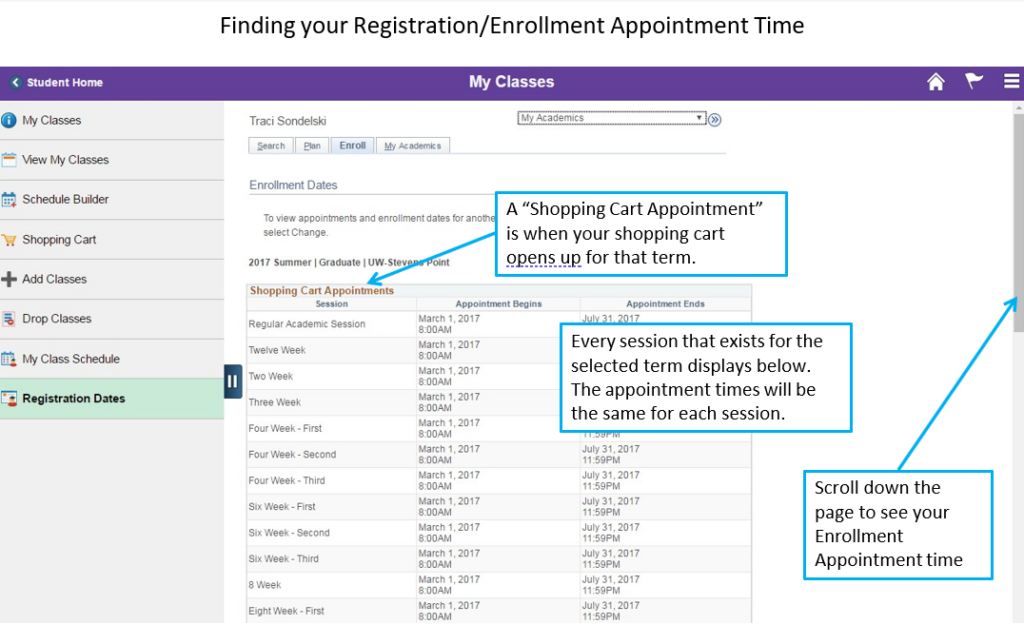
- Open the My Classes tile then Registration Dates.
- Select the term.
- Shopping Cart Appointment is when you can start adding classes to your cart.
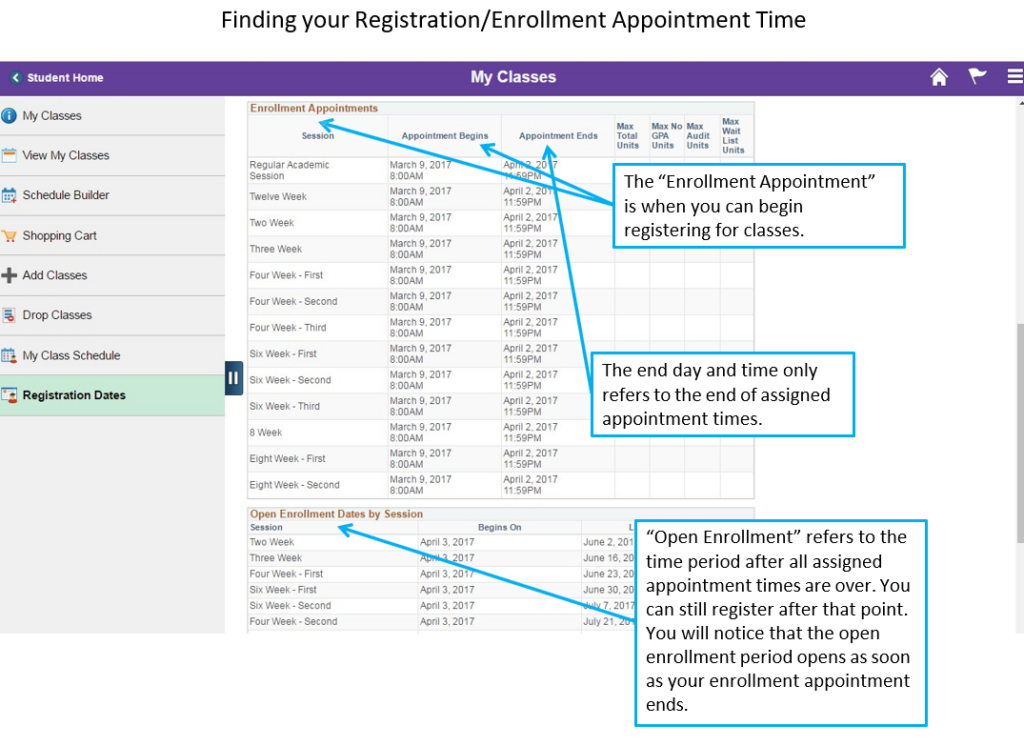
- Enrollment Appointment is when you can begin registering. You may register any time after this start time.
If you miss your appointment, you may register once your appointment time has passed. A proxy can also register for you—contact the Office of the Registrar for more information.
2. Check for Holds
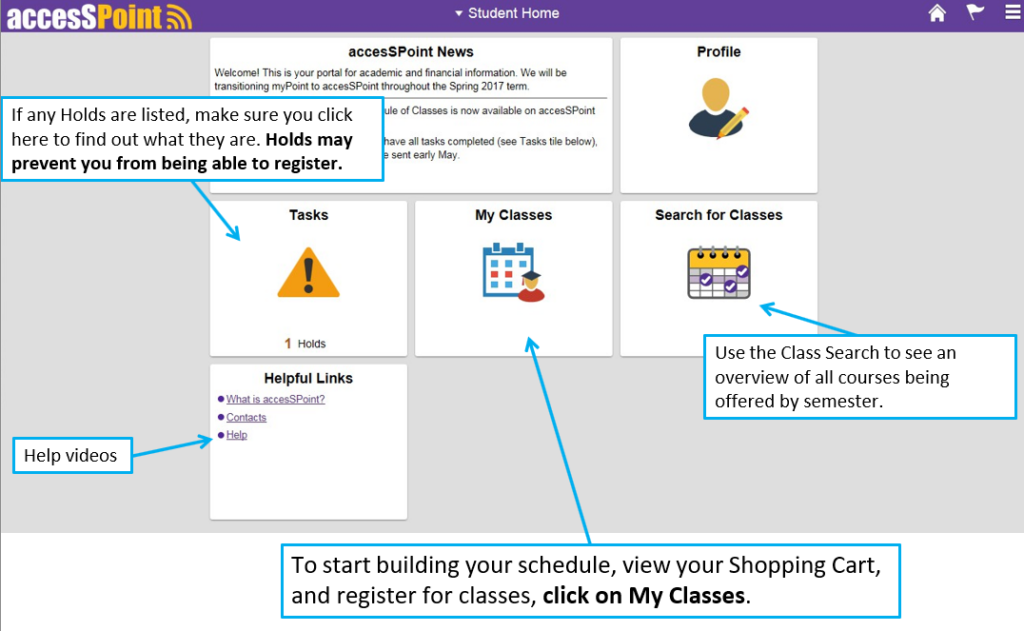
Open the Tasks tile to see if anything is blocking registration.
Required each term:
Students must complete the Required Registration Actions in the Tasks tile.
This includes:
- Updating contact information
- Adding/updating emergency contacts
- Acknowledging the Financial Agreement
Your registration hold is removed once the task is submitted.
International undergraduates:
Must pay the required insurance premium before registering for fall or spring. Pay online or at Student Financial Services. Questions regarding the insurance premium should be directed to the International Student and Scholar Services (ISSS).
3. Meet With Your Advisor
Your advisor’s name appears in the Profile tile in accesSPoint under the Advisor link on the left.
If you need an advisor:
- Have a declared major? If so, contact your major’s Department Chair to be assigned an advisor.
- If you have not declared a major, report to the Academic and Career Advising Center, Room 209, Collins Classroom Center.
Before your advisor meeting:
- Print your Degree Progress Report (DPR) from accesSPoint
- Bring two copies of your materials. You and your advisor will build a course plan and alternates.
- Review requirements for your major/minor/certificate
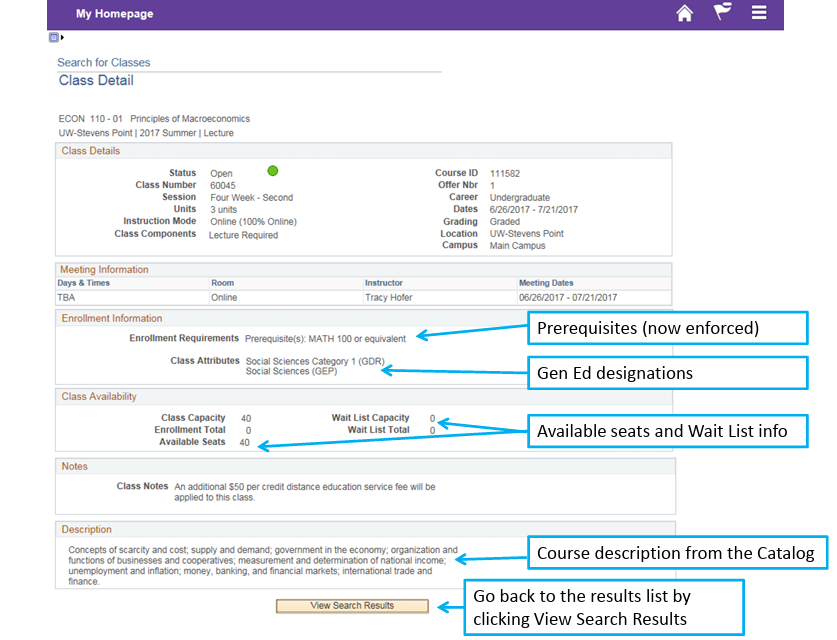
- Check the Course Catalog for the descriptions of your recommended courses
- Check course prerequisites
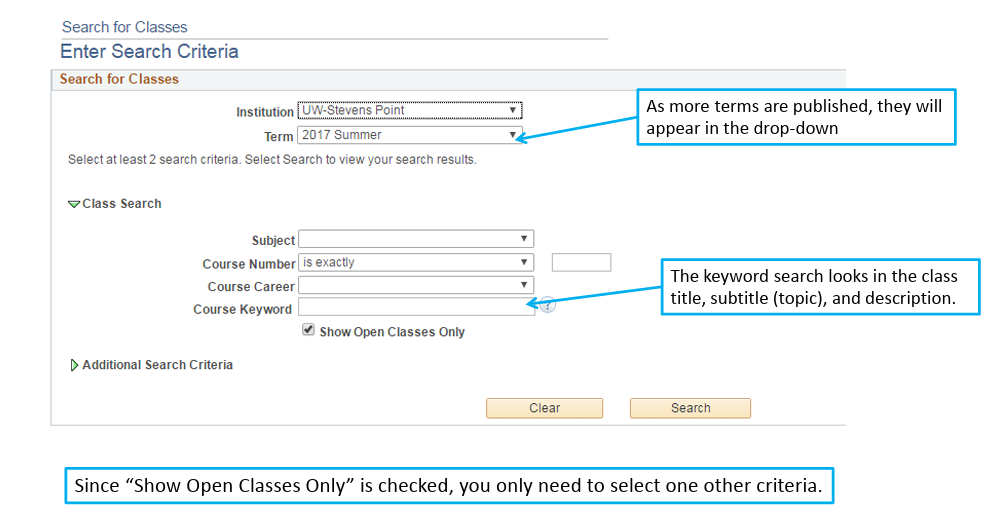
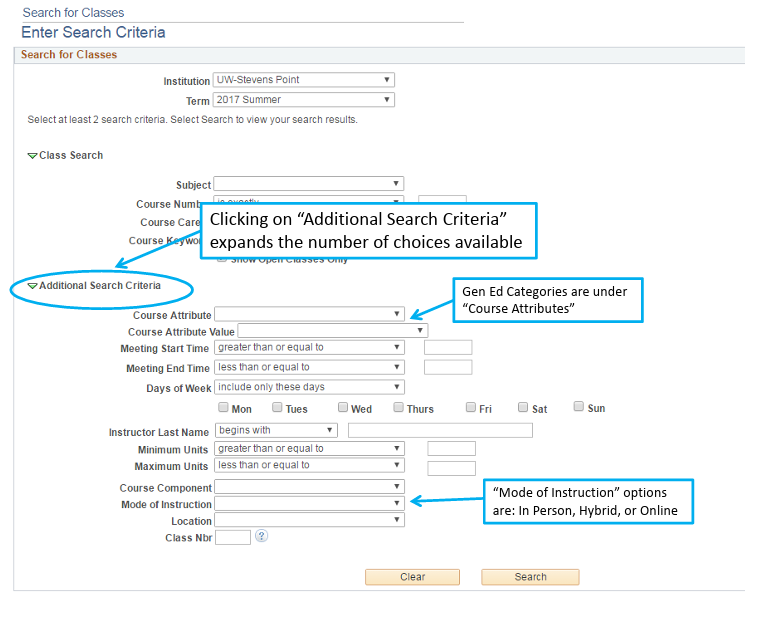
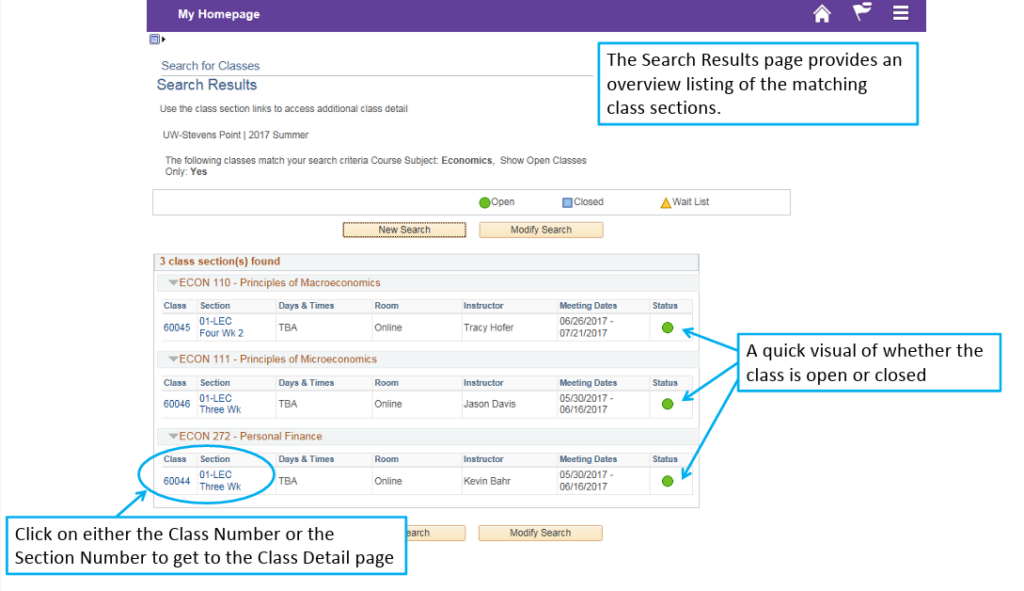
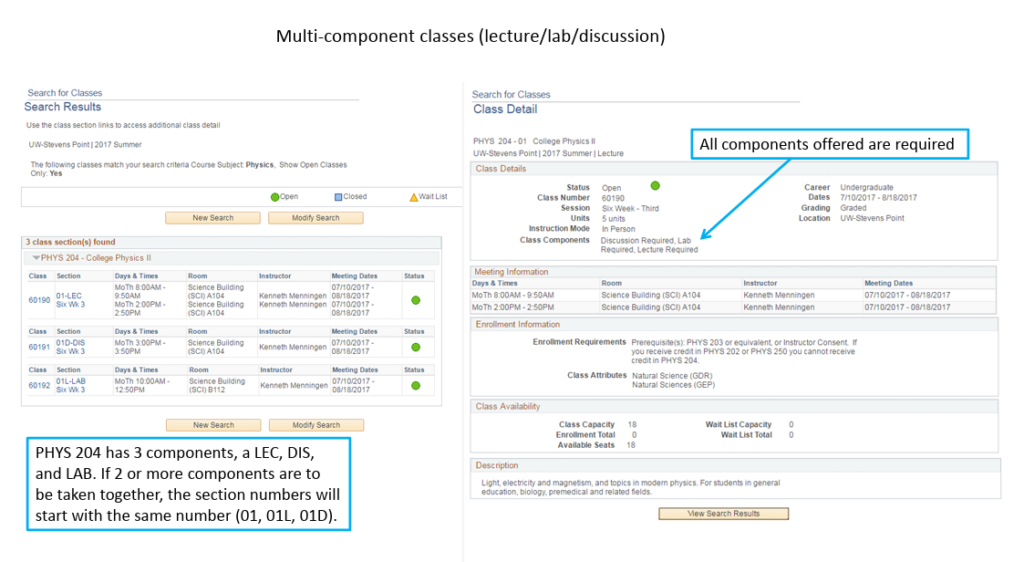
- Look up course offerings using Search for Classes tile in accesSPoint
4. Obtain All Special Registration Authorizations
Some classes require Instructor Consent or Department Consent as noted in the Schedule of Classes. Request permissions before your registration appointment.
- Instructors can grant permissions for classes they teach which are Instructor Consent required.
- Department consent must be granted by the department chair of the course.
If repeating a course, your advisor must approve and forward your request to the department chair. You will be able to add the course yourself online.
Some approvals require eForms (e.g., auditing a course, lifting the 12‑credit limit).
View available forms through the Forms tile in accesSPoint.
5. Build Your Schedule
- In accesSPoint, open My Classes.
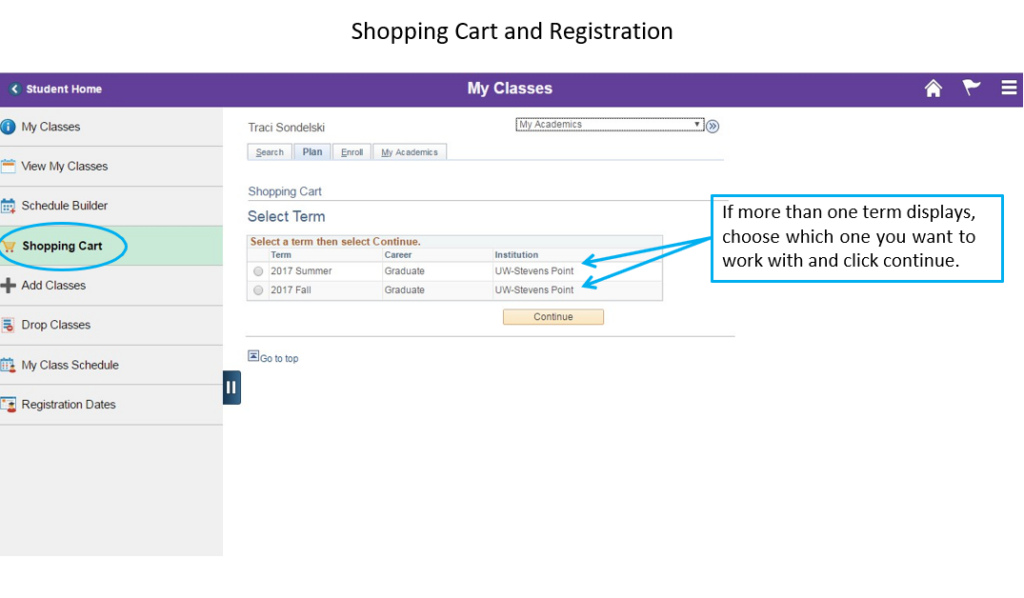
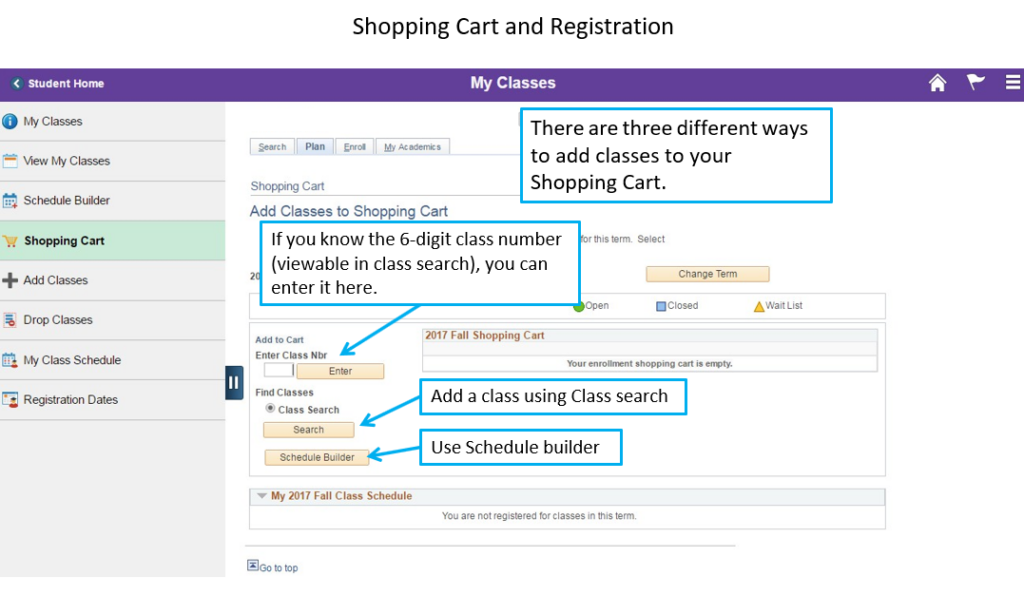
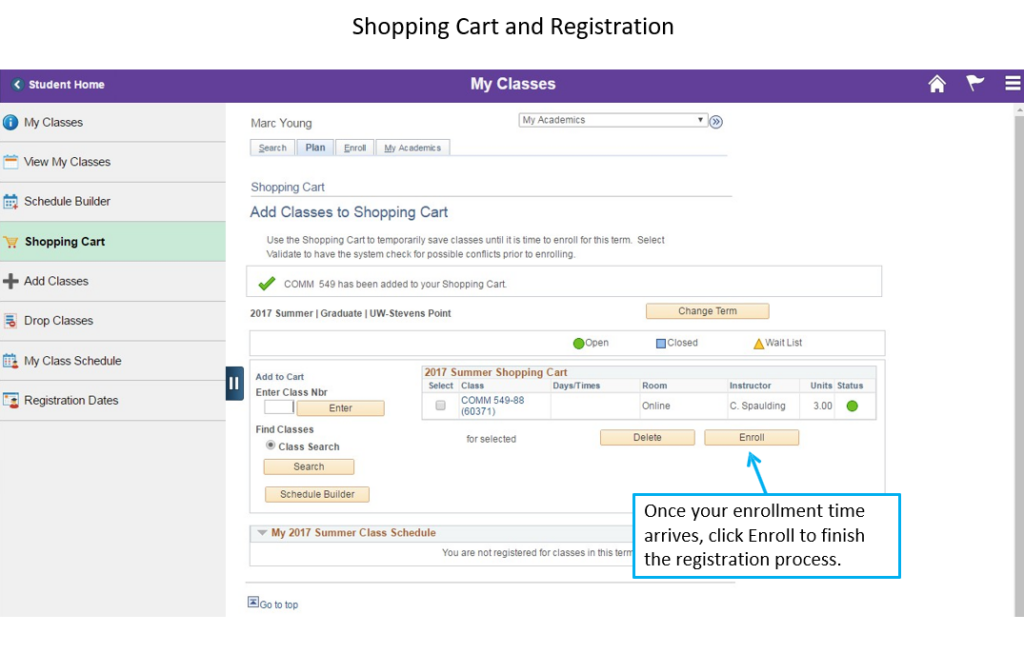
- Add class sections to your Shopping Cart (permissions applied automatically).
- Use Schedule Builder to create potential schedules and send them to your cart.
- Validate your cart to check for time conflicts and prerequisite issues. Revalidate periodically—class schedules can change.
6. Register at Your Appointment Time
When your enrollment window opens:
- Go to your Shopping Cart and click Finish Enrolling.
- A green checkmark means successful registration.
- A red X indicates an error and explains the issue.
A registration kiosk is available in the Office of the Registrar (101 SSC). Staff can help with registration-related questions Monday–Friday, 8:00 a.m.–4:30 p.m.
- First-Year students will register during one-day orientation/registration sessions. The Office of Admissions and Recruitment will send you details about your session.
- Transfers will register during a one-day orientation and registration session. Information about your registration date will be sent by the Office of Admissions and Recruitment.
- Re-entry Students will register with continuing students, based on your earned credits. Contact the Office of Admissions and Recruitment regarding dates and times.
- If you are currently enrolled: Follow the steps listed in the Continuing Students section above.
- If you are not currently enrolled at UWSP: Begin the process with the Office of Admissions and Recruitment in the UWSP Welcome Center (2108 Fourth Avenue).
If you need to meet with an advisor or obtain special permission to take a class, please arrange this before your registration window.
If you are not currently enrolled at UWSP and wish to register as a non-degree seeking student during for the fall, winterim, spring or summer term, you may register for courses by completing the online Universities of Wisconsin application. Select non-degree seeking or special student during the application process. No application fee or enrollment deposit is required for non-degree seeking students.
Questions about course registration? Contact the Office of the Registrar at 715-346-4301 or registrar@uwsp.edu.
Registration Authorizations and Restrictions
This section outlines the key registration conditions that may require departmental approval, overrides, or special permission—such as consent-required courses, prerequisites, closed classes, repeats, overloads, and credit restrictions.
Registration Authorizations and Restrictions
Instructor/Department Consent
Online authorization from the instructor or department is required before a student can register for the course in accesSPoint.
Prerequisites Not Met
Students cannot register if prerequisites listed in the Schedule of Classes are not met. An online override from the department, if approved, will allow registration.
Closed Courses
Students should check with the department of the course regarding their policy.
Repeating a Course
Students must receive approval to repeat any UWSP course previously completed or transferred in. Electronic authorization from the advisor and department chair is required to prevent administrative removal from the class.
Study Load
The typical study load is 14–17 credits per semester. Loads of 18–20 credits require approval through the Credit Overload Approval Form; 21+ credits require dean approval. All overload forms must be submitted to the Office of the Registrar, 101 SSC.
12‑Credit Hour Restriction
Students must complete required general degree courses (Math 100, 105 and English 101, 202, 150, per placement scores) before earning 60 credits. Failure to do so limits registration to 12 credits, which must include the missing math and English requirements.
Students placed into remedial math must complete those courses before earning 30 credits; otherwise, they are limited to 12 credits per semester, including the remedial courses, until completed.
Independent Study/Thesis Courses
Registration for special work, independent study, or thesis courses requires electronic authorization from the department chair. Students should obtain approval during advising, prior to registration. Most courses ending in 95, 96, 97, 98, or 99 (e.g., 399, 796) require this authorization.
W Drops
A W is assigned for official drops after the 8th day of full‑semester classes. Deadlines for other sessions are listed online. Failure to attend or drop by the deadline results in an F.
Registration-Blocking Holds
| Hold | Who added this hold? | Why was this hold applied? | How the hold can be resolved |
|---|---|---|---|
| Advisor Hold | Office of the Registrar | Students planning to register for a Fall or Spring term must meet with their academic adviser prior to registering. | Meet with your assigned academic adviser. Your adviser’s name and contact information is found in the Profile tile in accesSPoint. It is recommended that you do this in advance of your Fall/Spring enrollment appointment time. |
| Dean of Students | Dean of Students Office | Conduct sanctions were not completed by their deadline | Complete conduct sanctions or contact the Dean of Students Office to discuss progress towards completion. |
| Graduate Academic Standing | Office of the Registrar | Students did not meet the 3.00 cumulative GPA requirement for graduate students. | Meet with your graduate adviser or program director to discuss next steps. |
| High School Student | Office of the Registrar | High School students are not allowed to register for (or drop) classes on their own. | See High School Programs FAQ for registration information. |
| International Education | Office of International Education | The Office of International Education needs updated documents. | Submit updated documentation to the Office of International Education. |
| Medical Withdrawal Reg Hold | Student Financial Services | You had an approved medical withdrawal that requires documentation prior to you re-enrolling. | Contact Student Financial Services at 715-346-2118 or refer to your Medical Withdrawal approval letter to determine steps you must take prior to enrolling. |
| Need Final Transcript | Office of Admissions and Recruitment | UWSP is missing final transcripts, either from high school or from a college/university involved in a consortium agreement with the Office of Financial Aid. | Submit official copy of missing transcript(s). |
| Registration Hold | Office of the Registrar | All students must update their contact information, emergency contacts and complete a credit agreement prior to registration. | Complete the “Required Registration Actions,” found on the ToDo List of the Task tile in accesSPoint. |
| SF Block Enrollment | Student Financial Services | Student account has an outstanding balance totaling $500 or more, excluding those that are less than 30 days past due. | Submit payment to lower account balance to less than $500. Payment can be submitted in the Financial Account/Billing tile in accesSPoint or in person at Student Financial Services. |
Registration Visual Guide
accesSPoint
Finding your Registration/Enrollment Appointment Time
Shopping Cart and Registration
Class Search Visual Guide
Tips and Tricks