First‑Week Attendance Requirement
Instructors must record attendance at least once during the first eight days of the fall and spring semesters. This reporting helps the university support non‑attending students and ensures compliance with federal Title IV financial aid regulations.
Asynchronous Online Courses
A student is considered “attending” only if they complete an academic activity, such as:
- Posting in a discussion forum
- Completing a quiz
- Submitting an assignment
A login alone does not count as attendance.
Commenced Attendance Notifications
Students reported as “Never Attended” during the first eight days will receive an email notification from the Office of the Registrar.
Ongoing Attendance Monitoring
Federal law requires the university to return financial aid for students who do not complete at least 60% of the term. The last date of attendance/participation is used to calculate this return, so please monitor and record attendance throughout the semester—especially for students who stop participating.
How to Report Attendance in accesSPoint
Finding Attendance
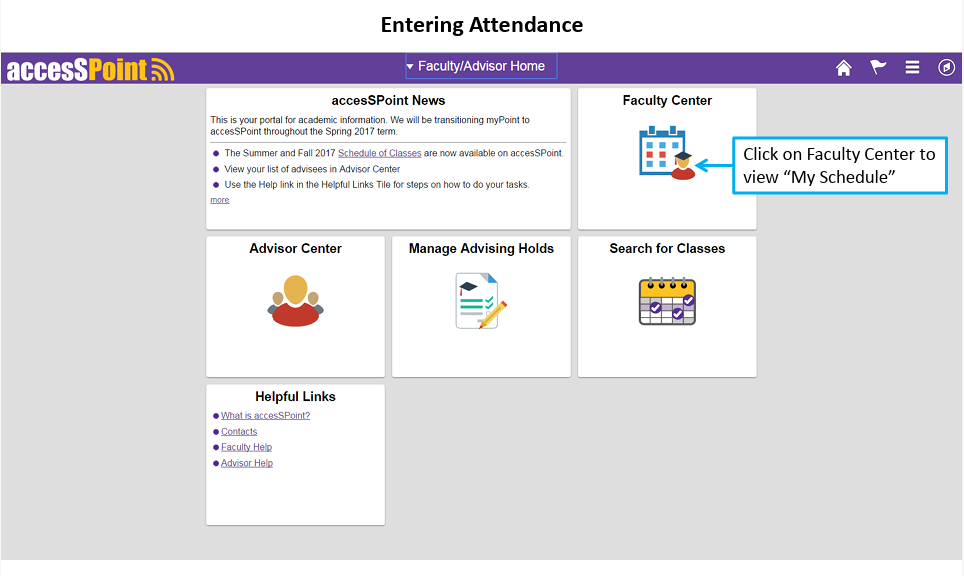
- Go to the Faculty Center tile in accesSPoint.
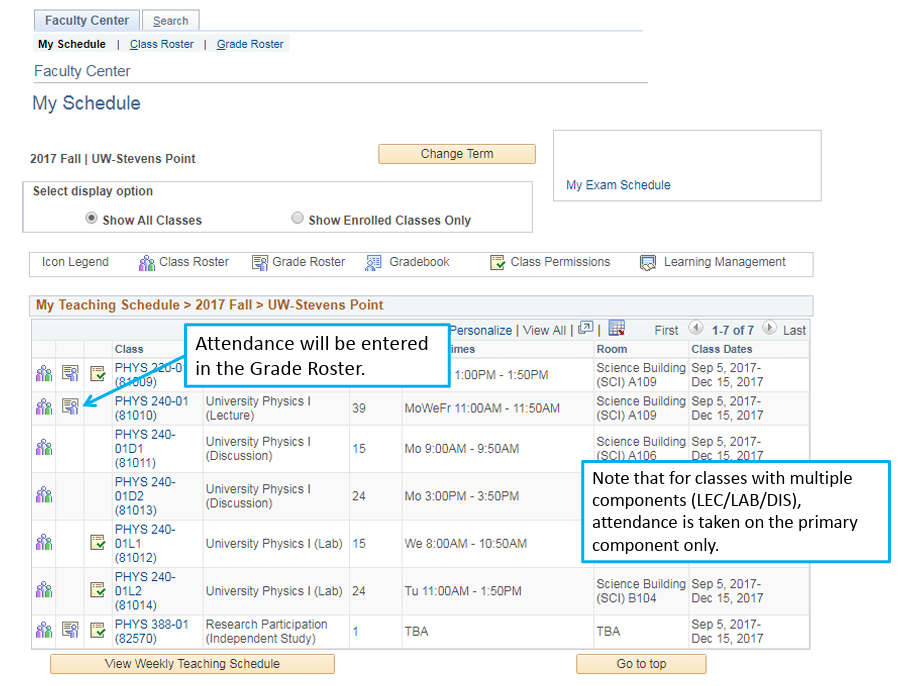
- Attendance reporting is located in the Grade Roster.
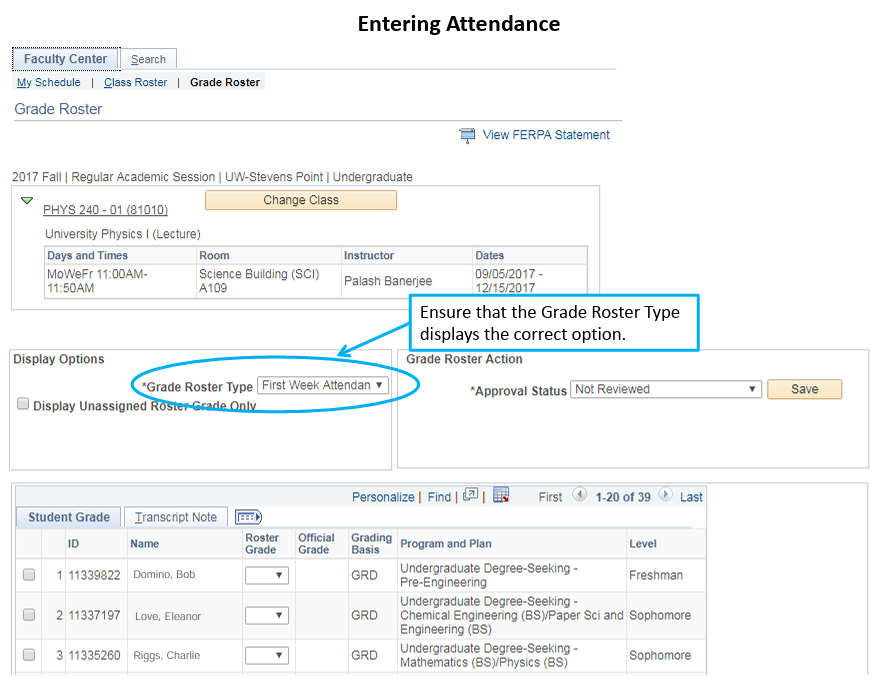
- Confirm that the Grade Roster Type is set correctly.
Marking Attendance
Attending Students:
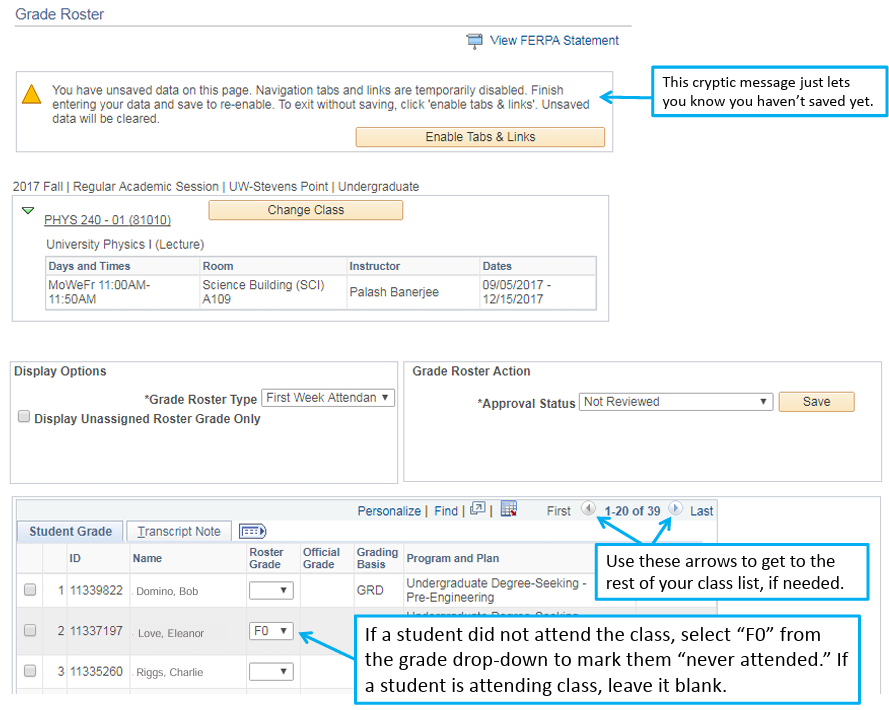
In the First Week Attendance Grade Roster, leave the Roster Grade field blank for students who are attending.
Absent or Non‑Attending Students:
- If a student notifies you of an absence then consider them attending.
- If you have not been contacted and the student has not attended, mark F0 (Never Attended).
- For students who stopped attending, select the F‑grade matching the last week they attended
- F0 = never attended
- F3 = stopped attending in Week 3, etc.
- If a student resumes attendance before the end of the term, update their status to Attending.
Submitting Attendance
Steps:
- Enter all non‑attending student updates.
- Set Approval Status to Attendance Completed.
- Click Save before exiting.
Important Notes:
- Only the instructor of record can submit attendance.
- Students are responsible for officially dropping classes.
- If they stop attending but do not drop the course by Week 10, they may receive an F.
- Only students who are not attending need to be reported on. There is no value or grade to enter for students who are attending.
- F0 represents Never Attended and is the only “grade” you need to use during the first week. The other “F” grades represent the week of the class that the student stopped attending and will be used later in the semester. “F3” would mean that the student stopped attending during the third week, and so on. You no longer need to record the exact date a student stopped attending, just identify the week.
- In the past, you were asked to update your attendance throughout the semester, but now this effort will be reduced to collecting attendance just three times.
- First Week (Commenced Attendance) – “never attended” info only.
- Mid-semester– a separate mid-semester attendance roster will be created at about week 7 of the fall and spring terms so you can identify any students who have stopped attending up to that point.
- During Final Grade submission– when you submit final grades for the semester, use of the F1/F2/F3 grades will replace entering an actual date of last attendance. The F1/F2/F3 will be converted into a regular “F” grade on grade reports and transcripts.
Submitting Attendance Visual Guide: