
Welcome to UW-Stevens Point!
This page will share with you everything you need to know about being well prepared for your appointment! We look forward to meeting you!
Preparing for Your Appointment
In order for your Academic Adviser to help you decide on your first semester of classes, it is critical we have information about any potential incoming college credits and that we know your math and English placement scores.
Scheduling Your First Advising Appointment
Use your UWSP username and password to access the Admitted Student Portal. Once you are in the portal, you will first register for your in-person Orientation date. The earlier your orientation date, the earlier advising availability you will see. Then you will select an adviser and schedule your 1-hour virtual advising appointment.
If you have any questions or need assistance scheduling your Orientation and Academic Advising appointments, please contact the Office of Admissions and Recruitment directly at 715-346-2441 or admiss@uwsp.edu.
Reporting Incoming College Credit
Your adviser will benefit from knowing any possible college credit you may have earned while in high school, through college/university courses, dual enrollment or credit by exam (AP/IB/CAPP).
Taking the Math and English Placement Exams
Register for the UW System Online Placement Exams (beginning in March) and take the exams at least 3 weeks prior to your academic advising and registration appointment. Failure to do so may limit the options for your first semester courses.
We recommend all students take the English and Math Placement Exams. Students who have taken at least one year of a World Language are strongly encouraged to take the appropriate test in their language – even if they do not plan to continue that language in college.
Checking Your UWSP Email
While the Admissions Office may have been using your personal email alongside your UWSP email, all other offices on campus, including the Academic and Career Advising Center will send any communication specifically to your UWSP email address. Once an admitted student, it is very important to get in the habit of checking your email regularly so important information is not missed!
What to Expect During Your Appointment
We know students can feel nervous about their first advising appointment, but your Academic Adviser is here to welcome you and help you feel at home at UWSP, even during your first advising appointment.
Logging into AccesSPoint
During your first appointment with your Academic Adviser, you will be signing up for your first semester of classes! In order to do so, you will need to be able to log in to your accesSPoint account. Shortly before your appointment, make sure you are able to do so as some students do experience challenges with password resets.
If you experience any issues, please contact the IT Service Desk at 715-346-4357.
Getting Started and Navigating Zoom
Your first advising appointment will be held virtually using an online platform called, Zoom. If you have not used Zoom before, it is important to use your UWSP account to log in to Zoom prior to your appointment to ensure you are able to access it.
The IT department provides a helpful tutorial that can assist in learning how to use, and navigate Zoom.
Zoom TutorialThe Advising Process
Your first advising appointment will begin with introductions and your Academic Adviser will ask questions to get to know you.
If you have a major declared
If you have a major declared, your Academic Adviser will begin to share possible introductory major courses that you could take. Your Academic Adviser will also introduce the CORE General Education Program (CGER) and will provide direction on building a schedule that is a mix of major courses and general education courses.
If you are unsure on what you plan to study
If you are not sure on what you would like to study, that is absolutely okay! Many students are unsure of what they want to study in college when they begin. It is also very normal to have a major declared, but still be exploring it and unsure if it will be the major that you continue to pursue.
Your Academic Adviser will want to know more about your interests and can suggest possible exploration courses for you to try. Also, your Academic Advisor will introduce you to the CORE General Education Program (CGER), and will provide options to begin meet the general education requirements during your first semester.
REgistering for your first semester of classes
Once you and your Academic Adviser identify courses you plan to take for your first semester, your Academic Adviser will guide you through the registration process to enroll into those classes. Academic Advisers are unable to register students into classes, so you will need to be able to log in to your accesSPoint account in order to finalize your registration process.
Time for Questions
Once you are registered for your first semester of classes, your Academic Adviser will provide time to address any questions you may have.
After Your Advising Appointment
After you have met with your Academic Adviser, you will be enrolled into your first semester of classes at UWSP! Here are some to-do’s you may need to address after your appointment.
Attend Your In-Person Campus Orientation
All first-year students are required to attend an in-person orientation on campus. You should have registered for a date sometime over the summer when you scheduled your advising appointment. If you have any questions regarding your in-person campus orientation, contact the Office of Admissions and Recruitment directly at 715-346-2441 or admiss@uwsp.edu.
Most students will have met with their Academic Adviser prior to their in-person orientation. Bring a copy of your class schedule in case you would like to tour the campus and see what academic buildings you will need to travel to for your classes!
How to find your class schedule in accesspoint
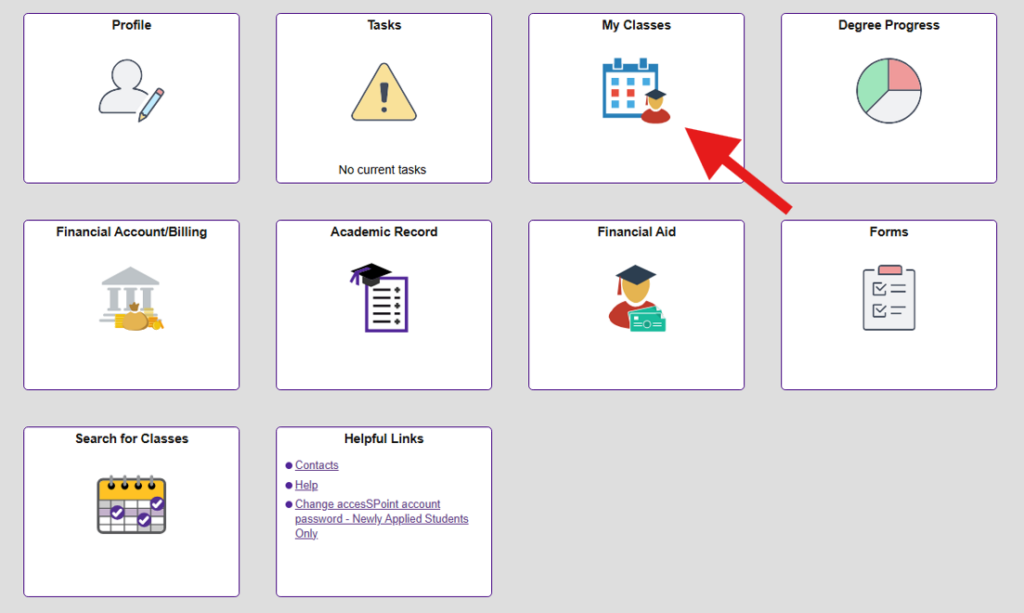
To find your list of registered classes or to view your class schedule, log in to accesSPoint and select the “My Classes” tile.
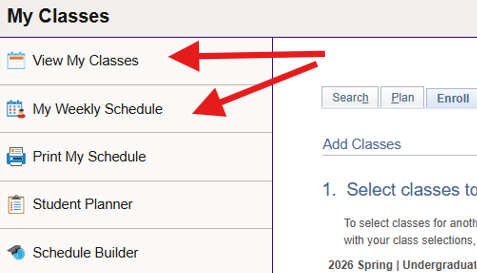
Once within the “My Classes” tile, you can select either “My Classes” or “View My Class Schedule” to view your registered classes or view your class schedule.
Submit Any Needed Documentation
During your advising appointment, your Academic Adviser may have shared that you need to send in test scores or college transcripts in order to have any completed college credit officially transferred into UWSP. The following resources can assist you with finishing that process.
Test Scores
Sending AP Scores Sending IP ScoresDual-Credit/College Credit
Dual-credit/college credits earned in high school require the official college transcript be sent to the Admissions Office. This is not the same as your high school transcript. To order your college transcript, go to the home page of the college or university, and in the search bar, type in “Transcript”. The search should provide the web page needed to order your official transcript from that college or university.
MAth Placement Exam
If you had not taken your math placement exam prior to your advising appointment, your Academic Adviser may have instructed to you to complete your math placement exam as soon as possible. Remember that a math placement score may be critical to know in your first semester to help you remain on time to degree.
Math Placement Test InformationShare Your AP Test Scores in July
We are aware that some AP scores will not be posted until July. You and your adviser will have discussed potential credit earned based on score earned for any incoming AP exams.
Once your AP scores are known, typically in July, email your Academic Adviser and inform them of your scores. Your Academic Adviser will assist you if any class changes need to be made based on your reported scores.
Get Connected to the Disability Resource Center (DRC), if needed
The Disability Resource Center (DRC) supports accommodations, assistive technology, and auxiliary services for students with disabilities, working individually with qualified students to identify, design, and implement an academic accommodation plan.
Some examples of disabilities include:
- ADD/ADHD
- Autism
- Traumatic Brain Injuries
- Systemic Health (examples: diabetes, Crohn’s/IBS, migraines, pollution illnesses, seizures)
- Deaf/Hard of Hearing
- Learning Disabilities (examples: dyslexia, processing disorders)
- Psychological Health (examples: anxiety, depression, PTSD, bipolar, OCD)
- Physical Conditions (examples: Arthritis, Cerebral Palsy)
- Temporary Conditions (examples: concussions, broken limbs, surgery recovery)
- Blind/Visually Impaired
It is important to set up any accommodations needed prior to the beginning of the semester so that the DRC and your instructors can be notified and provide what you need to have a successful first semester and beyond!
Applying for AccomodationsCheck Your UWSP Email
While the Admissions Office may have been using your personal email alongside your UWSP email, all other offices on campus, including the Academic and Career Advising Center will send any communication specifically to your UWSP email address. Once an admitted student, it is very important to get in the habit of checking your email regularly so important information is not missed!
Have questions about other campus resources, such as Housing and Dining, Financial Aid, or IT?