
Preparing and Registering for the Next Semester
Preparing for Course Registration
You are not alone in planning out your next semester of classes! Your Academic Adviser is here to guide you. Learn more about how to prepare for upcoming course registration.
Know Your Registration Date
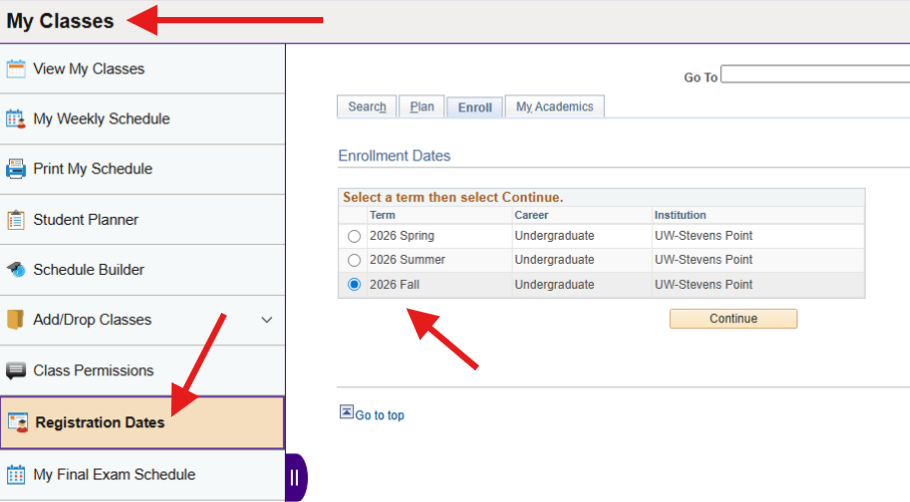
All students at UWSP are assigned a specific registration day and time in which they can register for an upcoming semester.
To locate when you can specifically register, log in to accesSPoint and select the “My Classes” tile. Select “Registration Dates” from the menu, and select the semester you would like to know your registration date for.
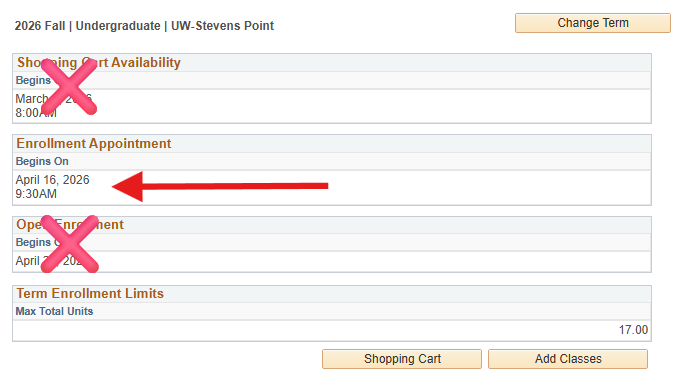
Your registration day and time will be listed under “Enrollment Appointment”.
Set Up Your Advising Appointment
To help students remain on time to degree, all students at UWSP are required to meet with an Academic Adviser before being allowed to register for an upcoming fall or spring semester. An “Advisor Hold” will be placed on your account and you must meet with your Academic Adviser in order to have it removed.
During peak registration times, your Academic Adviser’s schedule will become very full, so be sure to know when your registration date is, and schedule before you are able to register.
Schedule with Your Academic AdviserPrepare for Your Advising Appointment
It is important to prepare your advising appointment as much as you are able to. If declared in a major, most students are transitioned to departmental advising after their third semester. Your department adviser will expect you to know how to find and register for your classes. Take the time to learn how to while working with your ACAC Academic Adviser.
The resources provided in the Degree Planning portion of our website can assist you in knowing what classes you could or should take in the upcoming semester.
View Degree Planning ResourcesHow to Use Schedule Builder
UW-Stevens Point uses a program called, “Schedule Builder” to register for classes. You can find Schedule Builder within the “My Classes” tile in accesSPoint. When opening Schedule Builder, be sure to select the appropriate semester you are planning out and registering for.
The following resources can assist you in navigating how to use Schedule Builder to prepare for, and register for your upcoming semester.
Documents
- Registering for Classes in Schedule Builder
- How to Find CGER Courses in Schedule Builder
- How to Narrow Down Class Schedules in Schedule Builder
- Validating in Schedule Builder
Videos
Address Registration Holds
All UW-Stevens Point students will have two holds to remove before being able to register for an upcoming semester:
Removing the Advisor Hold
To help students stay on time to degree, all UWSP students are required to meet with their assigned Academic Adviser to have their “Advisor Hold” removed.
Schedule an AppointmentRemoving the Registration Hold
Students can remove their “Registration Hold” by completing the “Required Registration Actions” task within accesSPoint.
On the accesSPoint home page, select the “Tasks” tile, and within the “To-Do” section, complete the “Required Registration Actions” task.
How to Complete the “Required Registration Actions” TaskOther Holds on Your Account
You may have additional holds on your account that prevent registration that need to be addressed before your registration date. Learn more about all of the possible holds, what holds prevent registration, and how to take care of removing the hold so you can register.
Holds that Block RegistrationDuring Course Registration – Resources to Help You
It is very important to register on time, so review how to prepare for course registration early in the semester.
How to Register for Classes
It is important you register on time as seats can disappear fast in classes. These resources can help you complete the registration process.
Documents
How to Get on a Wait List
A class that you needed or wanted to take may close, if that is the case, do not panic! First, see if you can get on a wait list for the class. This resource can assist you in knowing if there is a wait list, and how to get on it. Some classes do not have wait lists.
How to Get on a Wait ListWhile on a Wait List
- Enroll into a back-up course while on a wait list in case you are not invited into the class
- Check your UWSP email daily as departments will contact students directly if invited into a class, and generally give the student 48 hours to accept the invitation before offering it to the next student on the wait list
If invited into a wait listed class, this resource can help you finish the registration process.
Document
How to Use Schedule Builder to Find Alternative Class Schedules
If one of your planned classes closes and need to find an alternative class, first review your advising worksheet that you completed with your Academic Adviser for alternative courses you can register for. Once you have courses identified, these resources can help you use Schedule Builder to see if other classes fit in with classes you are already enrolled into.
How to See If Other Classes Fit Into a Current Schedule How to Find CGER Classes in Schedule BuilderACAC Drop-In Advising Schedule
Need one-on-one help with registering? The ACAC provides drop-in registration assistance for students assigned to an ACAC Academic Adviser.
View ACAC Drop-In HoursAfter Course Registration
After you have registered for classes, make sure to take the time to check that all of your classes meet the requirements you intend them to. Also, learn what to do if you are on a wait list for a class.
Check Your Degree Progress Report
It is important all students review their Degree Progress Report (DPR) after registering for classes to ensure the enrolled classes are meeting the requirements intended. If you have any questions as to why a class may not be meeting an intended requirement, contact your Academic Adviser.
How to Access and Read Your DPRHow to Move From a Wait List to Enrolled
When you are on a wait list for a course, it is important to check your UWSP email daily. The department will email you to invite you into a class, and students generally have 48 hours to accept the invitation and enroll.
The following resource can help you move from the wait list into an enrolled student into the course.
Moving From a Waitlisted Course to EnrolledMaking Class Changes
Before making any class changes, contact your Academic Adviser to make sure you know any time to degree implications of making a class change that is not already discussed within your advising worksheet.
If after a conversation with your Academic Adviser, changing a course is advised, the following resource can help you add, drop, and swap classes using accesSPoint.
When changing from one course to another course, it is highly advised to use the SWAP feature within accesSPoint as the swap feature will not drop you from your currently enrolled class until you are officially able to enroll into the new class. It is possible that if you drop a class and then add a class instead, any remaining seats can be taken before you are enrolled into the new class.
Adding, Dropping, and Swapping Classes in AccesSPointFrequently Asked Questions
Have a question and not sure where to find the answer? Try exploring these frequently asked questions advisers address during the registration advising season. Remember you can reach out to your adviser if you are still unable to find the answer to your question.
I need help with registering for my classes, where can I go for help?
If after reviewing the resources on this web page, you still need additional registration assistance, we are here to help! While you are welcome to email your Academic Adviser with questions, during peak advising times there could be a delay in their response.
The ACAC offers drop-in registration assistance that you can use on a first-come, first-served basis.
View ACAC Drop-In HoursIt’s my registration date, why am I unable to register for a class(es)?
If your registration day and time has arrived and you are still unable to register, check and make sure you have addressed any holds that block registration.
Other reasons you may not be able to register for a class:
- You do not meet the prerequisites required to take the class
- The class or section is reserved for specific populations, such as honor students, online students, or students in specific majors
Contact your Academic Adviser, or utilize the ACAC drop-in assistance if you think you can enroll into a class but are unable to.
I have a “Registration Hold” on my account, what is this?
The “Registration Hold” is placed on all UWSP student accounts and prevents registration for any upcoming semester. Only students are able to remove this hold.
How to Remove the Registration HoldBe aware that this is a different hold than your “Advisor Hold”. For more information on registration holds, visit Degree Planning.
The general education course I want to take is full, now what do I do?
If one of your CORE General Education Program (CGER) courses closes, you will need to select another course, either an alternative major, minor, or certificate course, or a different CGER course that meets the same requirement.
How to Find CGER Courses in Schedule Builder How to See if Other Classes Fit Into Current ScheduleWhere can I find my advising notes from my appointment with my Academic Adviser?
Students can find their advising worksheet completed during their meeting with their ACAC Academic Adviser in Navigate.
How to View an Appointment Summary in NavigateWhat do I do if I am on a wait list for a class?
While on a Wait List
- Enroll into a back-up course while on a wait list in case you are not invited into the class
- Check your UWSP email daily as departments will contact students directly if invited into a class, and generally give the student 48 hours to accept the invitation before offering it to the next student on the wait list
If invited into a wait listed class, this resource can help you finish the registration process.
Document
What if I want to enroll into a winterim or summer course?
Advisor Holds do not prevent students from registering for winterim and summer terms, however if interested in taking a winterim or summer class, contact your Academic Adviser regarding your interest. They can assist you in determining what may be the wisest class(es) to take during the winterim and/or summer session.
Wanting more help with planning your degree or learning more about how to prepare for your career outside of the classroom?