
Have you checked out your Major Map?
Degree Progress Report (DPR) – Graduation Requirements
One of the most important documents that you need to be familiar with is your Degree Progress Report (DPR). The DPR is your official degree audit report that records all the requirements needed to successfully graduate from UW-Stevens Point. When you apply for graduation, a graduate examiner will make sure all requirements on your DPR are satisfied.
Getting Started – How to Find your DPR
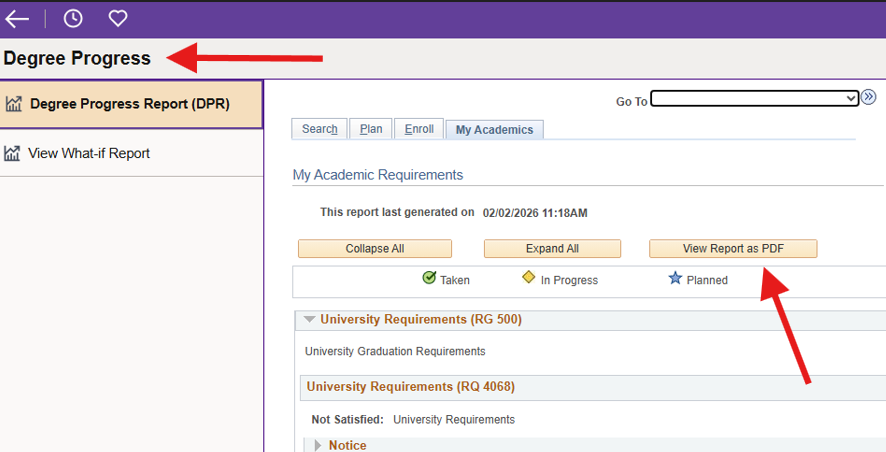
To locate your Degree Progress Report (DPR), log in to accesSPoint and select the “Degree Progress” tile. Open as a PDF for easier viewing, and for a printable version of your DPR.
How to Read your DPR
You are not alone in understanding your DPR! In addition to the resources provided below, your ACAC Academic Adviser and the ACAC Peer Advisers are here to assist you in learning how to read your DPR and walk you through the requirements for the CORE General Education Requirements (CGER) and your chosen major or any minors you may declare.
From there it will ultimately be your responsibility to monitor what requirements you have met and what requirements still need to be completed, and to ask questions as they arise. If you are an undeclared major, you will only see the CGER requirements listed until a different major is declared.
Document
Adding or Removing Majors, Minors, or Certificates
If you are interested in making changes to the majors, minors, and/or certificates you have declared, you can contact your assigned Academic Adviser to do so.
Student Planner – Your Graduation Plan
Student Planner is your electronic graduation plan. You and your ACAC Academic Adviser will use your Student Planner to map out what courses should or could be taken each semester, including potential summer or winterim courses. While your Degree Progress Report (DPR) will help you know what requirements you need to complete to graduate, your Student Planner can assist you in knowing in what sequence you will need to complete the requirements.
Getting Started – How to Find Student Planner
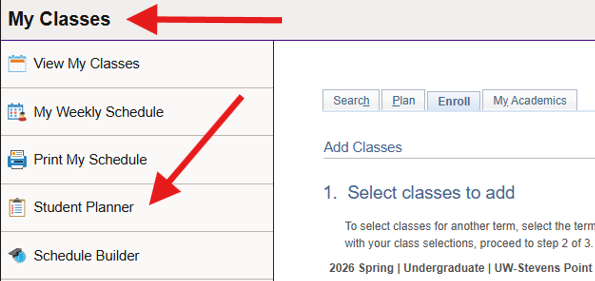
You can find Student Planner by logging in to accesSPoint, selecting the “My Classes” tile, and clicking on “Student Planner”.
If you do not have a Student Planner template in place yet, contact your Academic Adviser to request one be added.
How to Use Student Planner
The following resources created by the Office of the Registrar can help you learn how to use Student Planner.
Documents
Additional Degree Planning Resources
UW-Stevens Point provides a variety of additional resources beyond the Degree Progress Report (DPR) and Student Planner that can help you understand major, minor, and certificate requirements, as well as CORE General Education (CGER) requirements.
UWSP Course Catalog
The UWSP Course Catalog provides extensive information about major, minor, and certificate requirements including but not limited to courses required, course descriptions, course prerequisites, and total credits needed.
Filterable List of UWSP Majors, Minors, and Certificates Filterable List of Course Information Alphabetical List of UWSP Majors, Minors, and CertificatesSample Graduation Plans
Sample graduation plans are available for all majors and provide a general overview of when courses are typically taken during which semester of your college experience. The link below will take you to a filterable list of UWSP majors. Some majors provide a link directly to their sample graduation plan, whereas some majors require you to visit the department website first.
View Sample Graduation PlansDepartment Resources
Department websites will provide additional information regarding majors, minors, and certificates. The link below will provide you a filterable list for UWSP majors, minors, and certificates with a link called, “View Program” that will lead you to that department’s website.
View Program InformationNeed help with course registration or want to learn how to prepare for your career outside the classroom?